
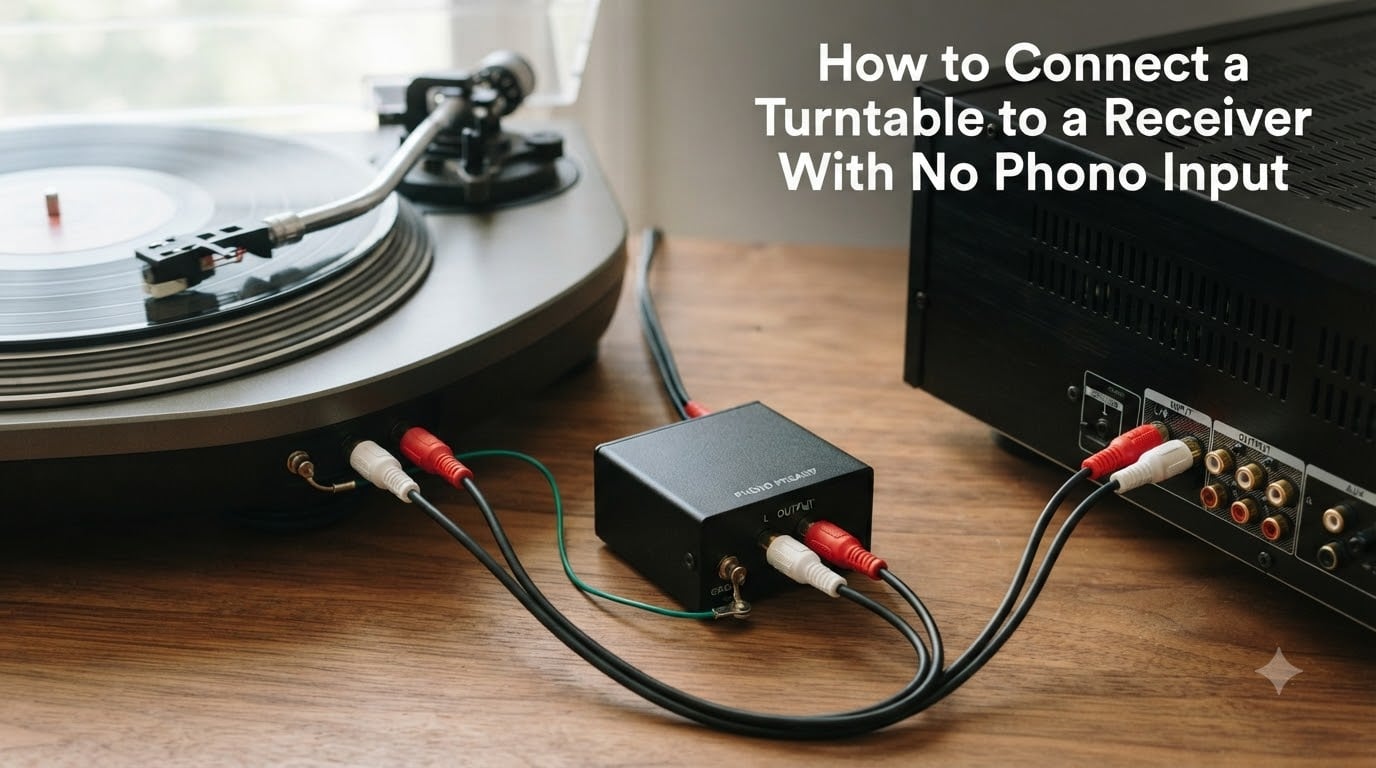
Connecting a turntable to a receiver with no phono input is a common problem, especially with modern AV receivers that skip the phono stage entirely. The good news is that the fix takes about 10 minutes and costs as little as $30. You only need a phono preamp, and you have two options: buy one as a separate box, or use a turntable that already has one built in.
I have set up dozens of vinyl rigs over the past few years, and I have run into the missing-phono-input wall more times than I can count. It is one of the most confusing parts of getting into vinyl for new listeners, and the frustration usually shows up as a barely audible, tinny sound or a loud hum that ruins the experience.
In this guide, I will walk you through both solutions in plain language, explain the ground wire (because skipping it causes that annoying hum), and help you avoid the most common mistake people make when they think their turntable is broken. Whether you have a vintage stereo receiver or a brand-new home theater AVR, the same principles apply.
Table of Contents
What Is a Phono Preamp and Why You Need One?
A phono preamp is a small device that does two jobs at once. It boosts the very weak signal coming from your turntable’s cartridge and applies a specific frequency adjustment called RIAA equalization. Without it, your records would sound extremely quiet and thin, almost unlistenable.
The reason this matters comes down to how records are made. When a vinyl record is cut, the producer applies a curve that reduces bass and boosts treble so the grooves physically fit on the disc. Your phono preamp reverses that curve during playback, restoring the original balance. It also adds roughly 40 to 50 dB of gain, because a moving magnet (MM) cartridge produces a tiny signal measured in millivolts.
Your receiver needs a much stronger signal, called line level, before it can do anything useful. Line level sits around 300 mV or so, which is why the phono stage exists in the first place. Older receivers had one built in. Many modern ones skip it to save space and cost, which is exactly why you are reading this article.
Phono Level vs Line Level Explained
Phono level is the raw, weak signal from your cartridge. Line level is the standardized signal your receiver expects from CD players, streamers, and tape decks. A phono preamp bridges those two worlds.
If you send a phono-level signal into a line-level input, you will hear sound, but it will be barely audible and tinny. The volume will be so low that you might crank your receiver to maximum just to hear anything, and even then the bass will be missing. If you send a line-level signal into a phono input, you will get harsh, distorted, overboosted audio that can actually damage your speakers at high volumes.
Moving Magnet vs Moving Coil Cartridges
Most turntables ship with moving magnet (MM) cartridges, which produce around 4 to 5 mV of output. That signal needs roughly 1,000 times amplification to reach line level. Moving coil (MC) cartridges produce even less, around 0.3 to 0.5 mV, and they need a preamp with much higher gain. If you have an MC cartridge, make sure any external preamp you buy explicitly supports MC, or look for a switchable model that handles both.
Do You Already Have a Phono Preamp?
Before buying anything, check whether your turntable has a built-in phono preamp. Many modern decks ship with one and include a small switch on the back labeled PHONO/LINE or THRU/PHONO EQ. Look at the back panel for RCA outputs near a tiny switch, or check your owner’s manual. If the switch is set to LINE, your turntable is already outputting a line-level signal and you can skip the external preamp entirely.
Confusion about whether a turntable has a built-in preamp is one of the top questions I see in audio forums. People buy a new turntable, plug it into their receiver, and assume something is broken when the sound is wrong. Nine times out of ten, the PHONO/LINE switch is in the wrong position.
Solution 1: Use an External Phono Preamp
An external phono preamp is a small metal box that sits between your turntable and your receiver. The signal chain goes: turntable RCA cables into the preamp, then a second set of RCA cables from the preamp into any line input on your receiver. This is the most popular solution because it keeps your turntable simple and lets you upgrade the preamp later for better sound.
You can find solid entry-level phono preamps starting around $30 to $50, and audiophile options run several hundred dollars. For most people starting out, an affordable model works fine. Look for one with a ground terminal (the small screw post labeled GND) because you will need it to connect the turntable’s ground wire.
One advantage of an external preamp is isolation. The preamp sits away from the turntable’s motor and other internal electronics, which can reduce noise. External preamps also tend to use better components than the tiny circuits built into budget turntables, so you get cleaner sound and lower noise floor.
What to Look for in a Phono Preamp?
Make sure the preamp matches your cartridge type. Most turntables use moving magnet (MM) cartridges, and almost every external preamp supports MM out of the box. If you have a moving coil (MC) cartridge, you will need a preamp with MC compatibility or higher gain. For beginners, MM is the safe default.
Look for a metal chassis rather than plastic, since metal shields against interference. Check that the unit has both RCA inputs and RCA outputs, plus a GND terminal. Some models also include a 3.5mm output for connecting to powered speakers directly, which is handy if you ever skip the receiver.
Solution 2: Use a Turntable With a Built-In Preamp
If you are buying new or have a newer turntable, you may already have a built-in phono preamp. Brands like Audio-Technica, Fluance, and Pro-Ject sell models with switchable preamps, and the switch is usually on the back near the RCA outputs. When the switch is set to LINE, the turntable outputs a line-level signal you can plug into any standard input on your receiver.
This is the simplest solution because you do not need an extra box or extra cables. You just run your turntable’s RCA cables directly to the receiver. The trade-off is that built-in preamps are usually lower quality than a dedicated external unit, because the tiny circuit board sits inside the turntable next to the motor and other noise sources.
For most casual listeners, that difference does not matter. The convenience of a single cable run is worth it. For vinyl enthusiasts chasing the best sound, an external preamp is worth the upgrade because it isolates the signal amplification from the turntable’s mechanical noise.
How to Tell if Your Turntable Has a Built-In Preamp
Check the back panel for a small switch near the RCA outputs. It will usually say PHONO/LINE, or sometimes THRU/PHONO EQ. If you see that switch, you have a built-in preamp. Also check for a USB output, since many USB turntables include a preamp for digitizing records. When in doubt, search your model number online with the phrase “built-in preamp” to confirm.
How to Connect a Turntable to a Receiver With No Phono Input (Step by Step)
Here is the exact process I use when I am setting up a turntable in my own home. Pick the option that matches your gear, and follow the steps in order.
Option A: Turntable Without a Built-In Preamp + External Phono Preamp
Step 1. Power off your receiver and turntable. Unplug them from the wall while you connect cables to avoid any accidental shorts or pops.
Step 2. Connect your turntable’s RCA cables to the INPUT jacks on the external phono preamp. Match red to red and white to white. The colors are standardized, so red is always right channel and white is always left.
Step 3. Connect the turntable’s ground wire to the GND terminal on the phono preamp. Loosen the small screw, wrap the bare wire around it, and tighten it back down. This step is critical for avoiding hum, and I cannot stress it enough.
Step 4. Run a second RCA cable from the OUTPUT of the phono preamp to any line-level input on your receiver. CD, AUX, TAPE, or VIDEO all work the same way. They are all line-level inputs, so pick whichever one you are not already using.
Step 5. Power everything back on. Set your receiver’s input selector to the input you used (CD, AUX, etc.). Drop the needle on a record and enjoy.
If the sound is very quiet, double-check that the preamp is powered on (some models need a power adapter). If you hear a loud hum, go back to Step 3 and verify the ground wire connection.
Option B: Turntable With a Built-In Preamp
Step 1. Make sure the PHONO/LINE switch on the back of your turntable is set to LINE. If it is set to PHONO, the turntable outputs the raw phono-level signal and you will get the same tinny sound as plugging in without a preamp at all.
Step 2. Connect the turntable’s RCA cables directly to any line-level input on your receiver (CD, AUX, TAPE). Do not use the PHONO input even if your receiver has one, because that would cascade two preamps.
Step 3. Connect the ground wire to your receiver’s GND terminal if one is available. Some receivers without phono inputs still have a ground screw on the back panel, so check carefully.
Step 4. Set your receiver to that input and test playback. If everything sounds right, you are done.
Ground Wire Connection: What It Does and Why It Matters
The ground wire is the thin, often bare wire that comes out of the back of your turntable next to the RCA cables. Its only job is to connect the turntable’s metal chassis to the ground terminal on your preamp or receiver. This drains away electrical noise that the cartridge naturally picks up from nearby power sources and internal components.
If you skip this connection, you will hear a loud 60 Hz hum that gets louder as you turn up the volume. I have heard this hum so many times in forums and at friends’ houses that I can recognize it from across the room. The fix is almost always the same: connect the ground wire to the GND terminal.
Not every setup needs the ground wire. Some external phono preamps do not have a ground terminal, and some turntables do not include a ground wire at all (especially Bluetooth models or USB-only decks). If your system hums and there is no ground terminal available, try a ground loop isolator on the RCA cables or check whether the cable shielding is damaged.
What Happens Without the Ground Wire
Without the ground wire, the turntable’s chassis floats electrically. The cartridge acts like a tiny antenna, picking up 60 Hz electromagnetic interference from your home’s wiring and any nearby transformers. That interference gets amplified along with the music signal, which is why the hum gets louder when you turn up the volume. Connecting the ground wire gives that interference a safe path to drain away before it reaches your speakers.
Input Selection: Line vs Phono vs Aux
Once your turntable and preamp are wired up, you have one more decision to make: which input on your receiver should you use? The answer depends on where your preamp lives in the signal chain.
If you used an external phono preamp, the preamp’s output is already line level. Plug it into any line input on your receiver: CD, AUX, TAPE, VIDEO, or even a streaming input. All of these inputs are electrically identical. They are just labeled differently for convenience. Do not use PHONO, because the receiver’s phono stage will try to re-amplify an already-amplified signal.
If your turntable has a built-in preamp set to LINE, the same rule applies. Use any line-level input. If you accidentally use PHONO while the built-in preamp is active, you will hear boomy, distorted, exaggerated sound. This is the cascading preamps problem, and it is the single most common mistake beginners make.
Cascading Preamps Warning
Cascading preamps means double amplification. You boost the signal once in the turntable’s built-in preamp, then boost it again in the receiver’s phono stage. The result is harsh, distorted, blown-out sound that makes your records sound terrible. The bass becomes overwhelming and boomy, the treble becomes piercing, and the overall volume is far too high for normal listening.
This problem comes up constantly on audio forums. Someone plugs a turntable with a built-in preamp into a receiver’s PHONO input, hears terrible distortion, and assumes their turntable is broken. The fix is simple: only use one phono preamp at a time. Either turn off the built-in preamp (switch to PHONO/THRU mode) and use your receiver’s phono input, or use the built-in preamp (switch to LINE) and plug into a line input. Never both.
What If My Receiver Only Has Digital Inputs?
Some modern AV receivers have dropped analog inputs entirely, keeping only HDMI and optical. In that case, you need an analog-to-digital converter (ADC) between your phono preamp and the receiver. These small boxes take RCA input and output optical or coaxial digital. They are inexpensive and solve the problem cleanly if your receiver has no analog line inputs at all.
Troubleshooting Hum, Buzz, and Noise Issues
Hum and noise issues are the most common frustration when connecting a turntable. Here is the troubleshooting checklist I run through whenever I help someone set up a vinyl system. Work through these in order, testing after each fix.
1. Is the ground wire connected? This fixes about 80 percent of hum problems. Make sure the bare wire is touching metal under the screw and is tight. A loose ground wire is just as bad as no ground wire.
2. Are you using the correct input? Line-level signal in a phono input, or phono-level signal in a line input, will both cause distortion or weak sound. Verify which input you are plugged into and which mode your turntable switch is set to.
3. Are your cables in good shape? Old or damaged RCA cables can introduce buzz. Try a different cable if you have one available. Look for kinks, exposed wire, or loose connectors.
4. Is your turntable too close to other electronics? Speakers, power amps, and Wi-Fi routers can introduce interference. Move the turntable a few feet away if you can. Keep it away from large power transformers and subwoofers.
5. Do you have a ground loop? If the hum only appears when the receiver is also connected to a TV or another source via HDMI, you may have a ground loop between devices. A ground loop isolator on the RCA cables often solves it. You can also try plugging all your audio gear into the same power strip.
6. Is the cartridge properly seated? A loose cartridge can cause crackle, channel dropouts, or hum. Re-seat it according to your turntable’s manual. Check the four small wires connecting the cartridge to the tonearm.
7. Is the preamp switch in the wrong position? If your turntable has a PHONO/LINE switch and you are using an external preamp, the switch should be set to PHONO (or THRU). Setting it to LINE while also using an external preamp will cascade the two preamps and cause distortion.
Quick Connection Checklist
Before you finalize your setup, run through this short list. Turntable RCA out to preamp in, ground wire connected, preamp out to receiver line input, receiver input set correctly, no cascading preamps. If all five items check out, you are done and ready to listen.
Frequently Asked Questions
What if my receiver doesn’t have a phono input?
You have two practical options. Buy an external phono preamp and connect your turntable through it to any line-level input on your receiver (CD, AUX, or TAPE). Or use a turntable with a built-in phono preamp and plug it directly into a line-level input. Either solution works without needing a new receiver.
Can I connect a turntable to a receiver without a phono input?
Yes, you can connect a turntable to a receiver without a phono input. You just need a phono preamp somewhere in the signal chain. The simplest setup is a turntable with a built-in preamp plugged into a line-level input on your receiver, or an external phono preamp between the turntable and the receiver.
Do I need a phono input for a turntable?
You need a phono preamp, but it does not have to be built into the receiver. You can use an external phono preamp or a turntable with a built-in preamp. A dedicated phono input on the receiver is just one of three places the preamp can live.
What happens if you don’t have a phono preamp?
Without a phono preamp, your records will sound extremely quiet and thin. You will barely hear anything, and what you do hear will lack bass and sound tinny. This happens because the cartridge output is too weak for a line input, and the RIAA equalization curve has not been applied.
Final Thoughts
Learning how to connect a turntable to a receiver with no phono input is one of those skills that unlocks the entire vinyl hobby. Once you understand the role of the phono preamp, the ground wire, and which input to choose, almost any receiver and turntable combination will work together.
Start with whichever option fits your budget and gear. Connect the ground wire every time. Avoid the cascading preamps trap by using only one phono stage at a time. From there, you can always upgrade the preamp later if you want better sound as your system grows.